

Imagine you're three hours into a five-hour holiday drive to visit family. Your daughter asks, "Can I use your work laptop to play Roblox?" This is the same laptop that holds sensitive client files, financial records, and full access to your business data.
You're tired from packing and still have a long way to go. Entertaining her seems tempting, but is it safe?
Traveling during the holidays exposes your digital security to risks not common in daily life. You're often distracted, fatigued, connecting to unknown networks, and mixing family fun with quick work check-ins.
Whether your trip is for business, leisure, or both, here is how to safeguard your data without spoiling the holiday joy.
Spend a quarter of an hour prepping your devices to avoid headaches later.
Install the latest security patches and updates.
Back up crucial files securely to the cloud.
Enable automatic screen lock within two minutes.
Turn on "Find My Device" for smartphones and laptops.
Fully charge portable power banks.
Pack your own charging cables and necessary adapters.
Clarify which devices children can safely use and which are off-limits.
Provide a family tablet or secondary device dedicated to entertainment.
Set up separate user profiles on your laptop if kids need access.
Pro tip: If kids need screen time on the go, bring a tablet unlinked to your work systems. Investing $150 in a separate device is a smart defense against costly data breaches.
Arriving at the hotel, your entire family connects their devices to the WiFi. Phones, laptops, tablets, and gaming consoles. Your teen streams movies, your spouse checks emails, and you're reviewing a crucial proposal.
But hotel networks are shared with hundreds of guests, many of whom could exploit unsecured connections for malicious purposes.
True story: A family connected to a fake hotel WiFi set up by a fraudster in the parking lot. For two days, all their online activities, including passwords, credit card information, and emails, were intercepted.
Confirm the exact WiFi network name directly from the front desk. Never guess.
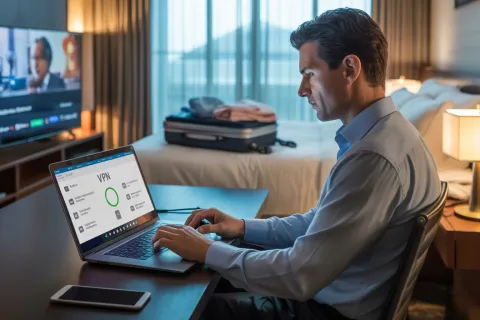
Use a VPN for any work-related browsing. It encrypts your data and keeps hackers at bay.
Rely on your phone's hotspot for sensitive tasks like banking or accessing confidential files instead of hotel WiFi.
Keep leisure and work activities separate. Let kids stream on hotel WiFi, but use your secure hotspot for business data.
Your work laptop holds critical resources such as emails, banking information, client files, and company software. Meanwhile, kids just want to watch videos or chat online.
Why it is risky: Kids can accidentally download malware, click unsafe links, share passwords, or forget to log out. These small actions can become serious security vulnerabilities.
Refuse access to work devices for kids. Say, "This is for work only, but you can use another device." Consistency is key.
Set up a separate restricted user account.
Closely supervise usage.
Prohibit downloads.
Do not save passwords.
Clear browsing history immediately after use.
Better option: Bring a dedicated family device for travel. An older tablet or laptop disconnected from your work accounts offers peace of mind.
Enjoying a movie on Netflix at the hotel? Someone logs in on the smart TV but forgets to log out before checkout.
Risk: The next guest may gain access to your account. If you reuse passwords elsewhere, this creates additional vulnerabilities.
Cast content from your personal device for safer viewing.
Set phone reminders to log out before departure.
Pre-download shows and skip hotel TVs entirely.
Banking platforms.
Work-related accounts.
Email services.
Social media.
Any accounts with stored payment details.
Holiday trips are hectic, and devices can easily get misplaced in restaurants, hotel rooms, rental cars, or airports.
Use "Find My Device" to locate it.
Remotely lock the device if not found.
Update passwords for critical accounts.
Inform your IT or MSP team.
Notify affected parties if sensitive data was stored.
Remote tracking enabled.
Strong password protection.
Data encryption.
Remote wipe capability.
If a family member loses a device, follow the same steps immediately.
Connecting your phone to a rental car’s Bluetooth may be convenient, but the system can store contacts, call logs, and message previews.
When you return the vehicle, this data may still be accessible.
Remove your phone from Bluetooth settings.
Clear recent destinations from the GPS.
Better option: Use an aux cable or avoid connecting altogether.
You planned family time, but emails and calls keep pulling you back in. This increases the chance of security mistakes.
Limit work email checks to two set times daily.
Use your phone hotspot instead of hotel WiFi.
Work privately in your room, not public areas.
Stay fully present during family time.
The most effective security strategy is simple. Take real time off when possible.
Prepare devices before departure.
Separate high-risk and low-risk activities.
Keep work and family devices separate when possible.
Have a response plan for security issues.
Set clear boundaries and stick to them.
The holidays should be about making memories, not dealing with data breaches or compromised information.
With a little preparation and better habits, you can protect your business while enjoying your time away.
Need help setting up secure travel policies for your business?
Click here or call (760) 388-2469 to schedule a free Discovery Call. We will help you create practical policies that protect your business without making travel difficult.
Because the best holiday memories should be about joy, not a hacked laptop.